This LPH Customized CRM tutorial and all the other tutorials are a part of LPH's commitment to make our customers as productive as possible and promote the ease of using LPH Customized CRM and reduce the amount of effort required.
Logging a Call in SuiteCRM
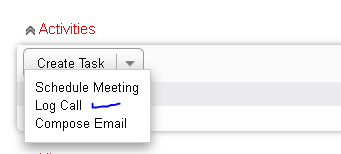
When you are in the Lead, Contact or Account modules you are able to log a call. Go to Activities. Click on Log Call. ( Blue check Mark )
A new menu will display. Fill in Subject ( Green check Mark). Select status (circled in Blue ) Outbound or Inbound and Held ot Not Held)
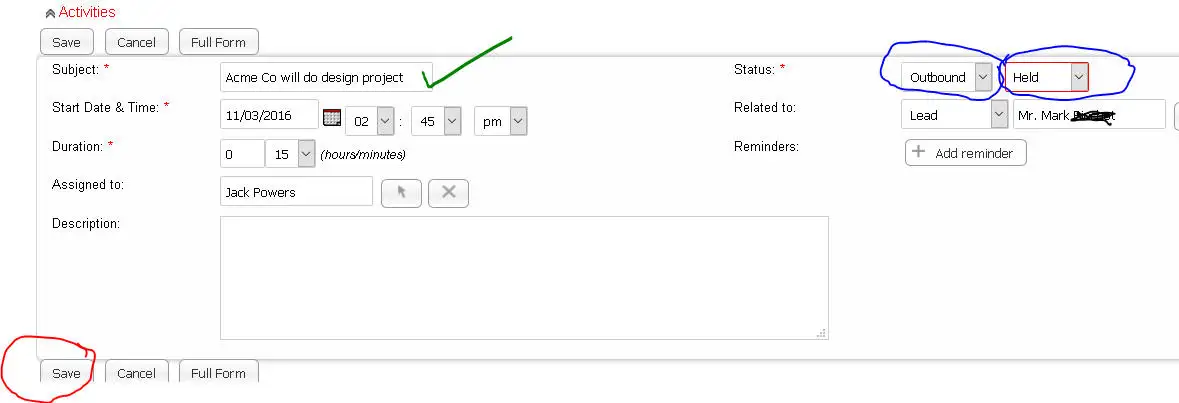
Click Save. (circled in Red ) The Log Call will be saved as a history item in the History section of the Lead, Contact or Account you are on.
If done while working on a Lead or Conrtact the history information will also roll up to the Account. If the call is stored as Held the call be
also be stored as an item in your calendar in Pink .
