This LPH Customized CRM tutorial and all the other tutorials are a part of LPH's commitment to make our customers as productive as possible and promote the ease of using LPH Customized CRM and reduce the amount of effort required.
To Create a Task
Go on either the Account or Contact you wish to create a task
Navigate to Activities & Click on Create Task

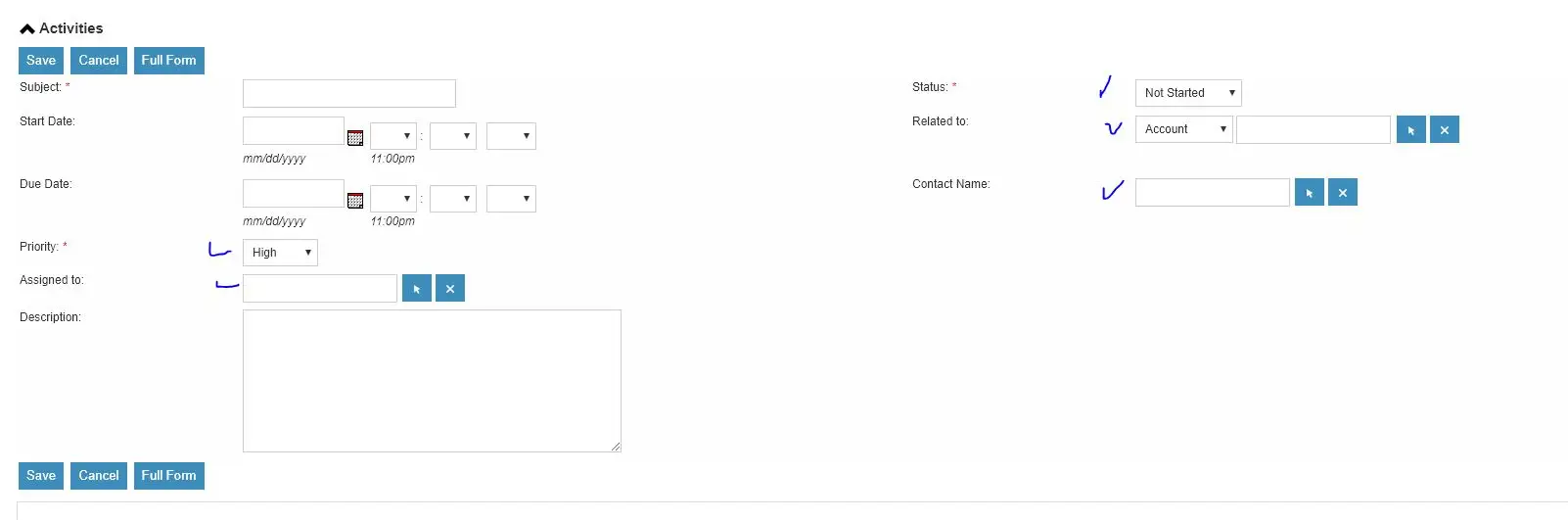
A menu will pop up. Fill in the subject line � suggestion: company name and or info so you
will recognize the activity in the Task list. Make sure information is filled in all the boxes that have check marks.
You may assign the Task to yourself or someone else on the system.
Using the Create Task tasks function doesn't provide a reminder or show up on the calendar .
Click on Save.
Click save. The new Task will be in the Tasks lists where you can review the tasks, edit them or reassign them.
